Pilot
$1,499Monthly from
- Supported deployment scope
1 production line or workflow
Up to 5 stations
15 operator accounts
1 facility
Monitor work orders, production stages, workstation activity, material usage, and inspection results through connected execution records accessible to production supervisors.
Production access, equipment interfaces and operating controls are defined for the deployment.
A work order may be released in the ERP, but that doesn't tell you whether an operator has started it, which operation is waiting, what material has moved or why finished production is behind schedule.
Manufacturing Execution System gives your team a structured way to record what actually happens on the factory floor. We scope it around the production events, work-in-progress records and interfaces your plant actually needs. This is an engineered deployment, not an out-of-the-box claim that every machine and ERP already connects.
Defined production route. Operator permissions and safety boundaries. Security and licensing acceptance. Explore the steps to see what must be recorded or verified.
Define the product, operations and work-center context.
Execution workflow illustration. Equipment interfaces require verified engineering.
Imagine a supervisor trying to answer why a batch missed its shift target. The work order shows the intended quantity, but the useful evidence is elsewhere: the operation started late, a lot changed station, material was unavailable or a quality hold paused work. The system is intended to record and expose those execution facts while work is happening.
, the useful screen is short and focused: identify the job or lot, see the permitted action, start work, record an event and finish the step.
, the value is a traceable view of which work is open, which stage is waiting and what events explain the progress.
, equipment and ERP integration remain explicit engineering tasks, with agreed source-of-truth boundaries and tested interface behavior.
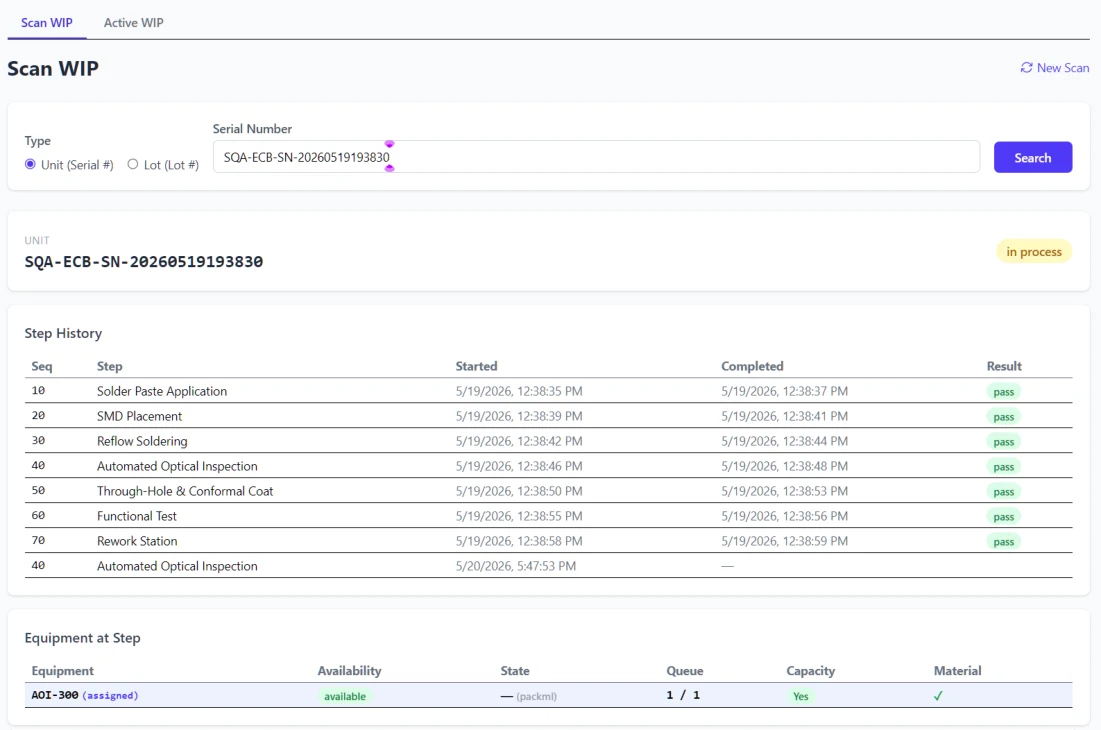
A supervisor should not have to interrupt three operators to learn where a lot is stuck. On a walkthrough, follow one unit or batch through dispatch, starting work, recording consumed material, applying a hold when something is wrong and completing the route. The source transaction and responsible operation should remain visible at every step.
Production access, equipment interfaces and operating controls are defined for the deployment.
The configuration environment can define products, operations, routes, equipment and relevant production rules. When a job is released, the execution record should show the product, step and dispatch status the operator is authorized to act on.
The underlying framework provides work-in-progress records for lots and individual units, operation execution, material lots and inventory movements. Focused execution interfaces can support scanning, starting and completing work at a station. Those steps become valuable when they match the real production process and physical controls.
Holds, dispositions, quality records and data collection give production teams a way to capture exceptional conditions before the status is lost in a shift handover. Lot and unit genealogy, where configured and supported by actual transaction data, help answer which materials and operations were associated with an affected output.
Dispatch, work schedules, equipment state, data-collection records and reporting endpoints can feed operations views. Live events may be displayed through a WebSocket channel. The dashboard must distinguish production counts, equipment indications and measured performance rather than treating a simulated signal as a real machine reading.
The underlying framework contains example and plugin-based interfaces for OPC UA, Modbus, MQTT, common ERP interfaces and event processing, as well as development simulators. These are engineering starting points, not proof that the customer's controller, ERP release or machine network will work without integration. A pilot should identify each signal, source of truth, protocol, exception and fallback path.
A production rollout requires an explicit review of sign-in controls for operators and supervisors, API authorization, equipment network segmentation, external interfaces and audit history. The security design must be demonstrated on the actual deployment before any live machine or commercial data is connected.
A shop-floor execution system helps when a released order reaches production but no one can see which operation is next, which material is usable or why work has stopped. Rather than waiting until the shift ends for an Excel summary, supervisors should be able to review the execution records the line is creating.
Choose a line or cell where delayed status, missing material, repeated scanning or unrecorded quality holds can be measured. Confirm its route, permitted users, equipment interfaces and reliable inventory events. Then compare actual queue time, operator touch points, rework and reporting delays before extending the system to other work centers.
Deployment limitation: Current demonstrations do not establish production authentication, shop-floor endpoint coverage, integration permissions, equipment safety boundaries or operational hardening. These require explicit verification. A demo or simulator does not establish a hardened production MES or prove that every factory can go live without site integration work.
Maintain the product, operation and routing information needed to describe how a manufactured item moves through a facility.
Associate work with supported plant, area, equipment and work-center structures so an event has operational meaning.
Represent the timing and planned production work that execution must respond to.
Show which lot, unit or operation is awaiting processing and what work can be released next.
Create, scan, start, process and complete supported lot-level and unit-level work with the appropriate history.
Record what happened at a workstation, not merely whether a top-level order was marked complete.
Use focused runtime and WIP interaction screens for daily execution while administrators work in separate configuration views. A dedicated inventory-operator client supports focused shop-floor inventory transactions in the applicable release.
Surface selected execution events and status changes to subscribed clients when the event infrastructure is configured and operating.
Track supported raw, intermediate and finished material balances relevant to shop-floor transactions.
Record movement and consumption associated with the executing work.
Relate production output to supported input material and execution context where source links were recorded.
Capture inspection, test or measured information as part of the production event when the configured process requires it.
Record why material or WIP cannot progress and the authorized action required to resolve it.
Review available WIP, material and equipment context together instead of joining separate end-of-shift reports by hand.
Use operational events and configured baselines to support meaningful line-level review rather than publishing unverified OEE claims.
Preserve the quantity basis across relevant product, inventory and work records.
Use versioned interfaces for product, execution, inventory, dispatch and reporting tasks.
Evaluate documented OPC UA, Modbus, MQTT and selected production-state interfaces on the actual machines and network.
Consider supported historian, message-broker and industrial middleware plugins where source versions and network access are validated.
Assess supported business-system plugins and data contracts individually; a simulator is not proof that a named enterprise integration is production-ready.
Add approved domain-specific logic or equipment adapters where the documented extension points support it.
Configure products, routes, equipment, user setup and integration settings separately from daily shop-floor execution. Current architecture documents local and OpenID Connect authentication with role permissions; the selected release, identity-provider setup and protected production endpoints still require verification.
Exercise orders and equipment signals in development before connecting real production equipment.
Check service health, integration status and event delivery as part of a staged deployment.
The first project can focus on a single work-in-progress workflow, production station or defined route. Record today's paperwork effort, exception frequency and actual reporting delays. Compare these with a tested pilot rather than making an unverifiable promise of higher overall plant throughput.
1 production line or workflow
Up to 5 stations
15 operator accounts
1 facility
Up to 3 production lines
15 stations
60 operator accounts
1 facility
Up to 10 production lines
50 stations
200 operator accounts
1 facility
Custom scope if any Operations limit is exceeded:
10 production lines
50 stations
200 operator accounts
Multi-site deployment
Implementation fees dependent on your organisations requirements. Site integration, security hardening, commissioning and deployment acceptance require a written technical scope. Deployment compatibility and the supported machine, network and data connections are confirmed before contracting. Package limits describe the managed deployment scope; equipment safety and control remain subject to site-specific engineering review.
No. An ERP typically owns orders, planning, purchasing and finance. A manufacturing execution system addresses the actual steps on the floor. We define what each system owns, what data can pass between them and what occurs if an integration becomes unavailable.
Not without examining protocols, interfaces and the installation. Can operators work on tablets? We test the chosen runtime views on the intended hardware. Do we need live machine signals on day one? Not always; a scoped manual execution workflow can be evaluated independently. How is regulatory compliance handled? Required records, electronic controls and validation obligations are assessed individually; no blanket certification is included.
We'll examine the operation, its source work orders and the production evidence you need. Then we can decide whether a focused MES project is warranted.