Core
$499/ month
1 facility
Up to 5 supported users
2 warehouse locations
2,500 active part records
Connect part availability, BOM requirements, stock movements, supplier orders, and production demand to make purchasing and build decisions using accurate inventory records.
A job should not wait while someone checks three spreadsheets and calls the warehouse to find out whether the right parts are available. Inventory Management connects your parts, stock locations, supplier records, purchase orders, bills of materials and production builds in one working system.
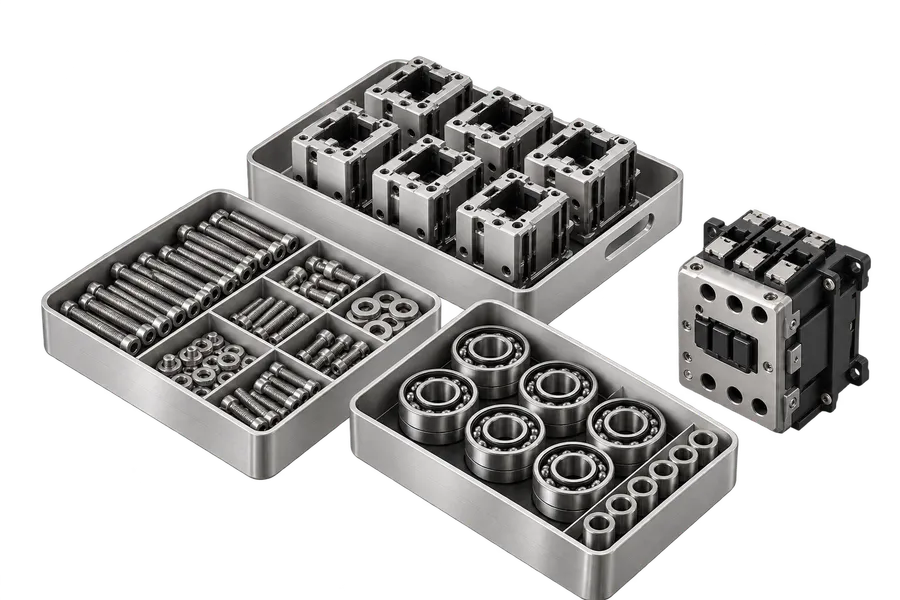
Built for equipment assemblers, panel builders, electronics manufacturers and other component-driven operations, the system helps your team work from the same part and stock records instead of repeatedly reconciling separate files.
Explore all 38 capabilities by the job your team needs to do. Open a capability for its full scope.
Arrange components into nested categories so engineers and stores can locate the same item quickly.
Define meaningful fields for part families, including units, dimensions and specifications, so similar-looking parts do not become interchangeable by accident.
Keep the company's part number connected to the specific manufacturer and supplier item codes used when purchasing.
Compare approved sources without losing the underlying part identity used in a drawing or bill of materials.
Distinguish purchasable components, manufactured assemblies and consumable materials so transactions follow the right workflow.
Retain the revision and technical context needed to investigate substitutions or changed requirements. Supported part images, attachments and documentation make identification easier at the shelf.
Highlight recorded replenishment thresholds as planning inputs, not as a guarantee that all shortages can be forecast automatically.
Record parts and supplier pack units appropriately so a box, metre or individual component does not silently become the wrong quantity.
Place stock in the real bins, rooms and stores your team uses, including appropriate external locations when configured.
Separate recorded on-hand quantity from material already allocated to builds or orders.
Investigate rejected, unavailable or otherwise restricted stock instead of treating every item as immediately usable.
Follow individually identified items where the process requires traceability; retain the actual movement history rather than reconstructing links later.
See when material arrived, who moved it and where it was recorded at each stage.
Record physical-count corrections with the supporting adjustment trail, including periodic stocktaking where configured.
Identify recorded expiration dates and avoid picking material beyond permitted use where the applicable rules are set up.
Record available stock-item test results against the specific unit when receiving or commissioning evidence matters.
Distinguish relevant ownership and external locations rather than assuming every item physically present belongs to available internal stock.
Link assemblies to child components, quantities and nested subassemblies, then show what is required to produce a particular quantity.
Bring controlled engineering lists into the system and maintain their version context; reconcile imported identifiers before releasing a build.
Examine required material against recorded stock to identify shortages before committing to production.
Track an assembly from planned work through material allocation, consumption and recorded output.
Reserve relevant component stock for a build and record actual consumption as it happens. Do not confuse reserved material with manufactured output.
Assess how many assemblies the recorded materials can support, subject to actual BOM accuracy and availability.
Record a finished serialized assembly and supported constituent histories for later investigation or service.
Where the workflow supports it, document the return of recovered components to stock rather than making invisible quantity corrections.
Record relevant outsourced manufacturing operations when a business uses an external assembler, subject to supported configuration.
Store the information needed to issue a correct purchasing order for an approved item.
Follow ordered components into the warehouse and reconcile quantities actually delivered.
Distinguish the technical manufacturer item from the commercial supplier item where needed.
Keep supported customer fulfillment demand alongside the inventory affected by it.
Record supported return-order and stock handling rather than silently increasing a stock balance.
Export supported histories, generate controlled report templates and trace what changed.
Use supported internal and external barcode schemes for stock or item lookup.
Supported mobile workflows cover parts, stock, purchasing, build and order views, subject to tested app and server compatibility.
Produce item and stock labels and operational documents with appropriate templates.
Limit relevant purchasing, stock and administration actions to authorized users.
Exchange data with selected systems through tested interfaces without claiming that every ERP integration works out of the box.
Surface operational events and exceptions in the supported deployment rather than relying on an external reminder spreadsheet.
Open a bill of materials and review the quantities needed for the job. Compare those requirements with recorded stock and current allocation before sending someone to find missing components.
Follow stock movements through locations, receipts, transfers and production consumption. When serial or batch tracking is relevant, keep item histories linked to the materials and builds that use them.
Keep supplier items, purchasing records and expected receipts in the same environment as the parts they supply. The purchasing team can see the context of a requirement rather than working from a detached requisition.
A missing component can delay a shipment even when a purchasing spreadsheet shows a positive balance. The useful question is whether the correct revision, in a usable location, is available for this particular build. That requires more than a warehouse quantity.
A production planner should be able to open a real assembly and see both the required components and the stock that can be allocated. Purchasing should know what to order before the job reaches an operator who cannot complete it.
A reported balance is not the same as free stock. Recorded stock can sit across nested locations, be reserved for another build, or be under a status that makes it unsuitable for immediate use. The stock view should reveal that context before someone commits to a production start date.
A controlled multi-level BOM shows which child parts an assembly needs and the quantity basis behind the requirement. Staff can inspect material availability, prepare purchasing actions and allocate incoming parts to the work that needs them. A real screen demonstration should show both the adequate-stock and shortage cases.
Give engineering, purchasing and stores the same component identity.
Consider one purchased component used in three different assemblies. Purchasing knows its supplier code, stores knows its bin and production knows which jobs need it. Those should be views of the same component, not three records that must be matched by hand. Follow this example from purchasing through material allocation and finished assembly to see the information each team can use.
A supplier may use one number, your drawing may use another, and the production team may refer to a shop-floor nickname. Your part record can link approved supplier items, manufacturer references, descriptions, units and specifications to the component your BOM actually needs. That reduces the risk of an apparently similar but incorrect item entering a job.
Illustrative record relationships
Parts, warehouse locations, build progress and purchasing. Genuine application views with sample data.
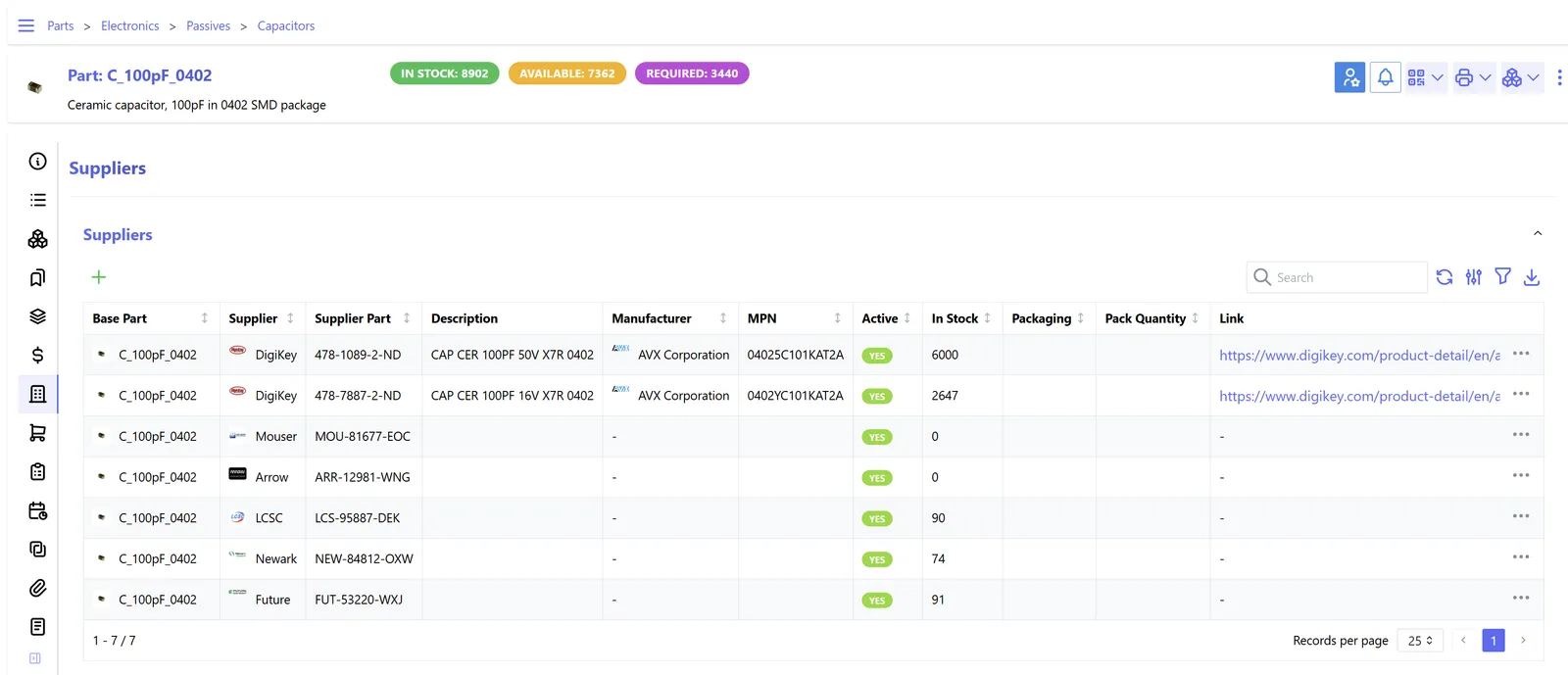
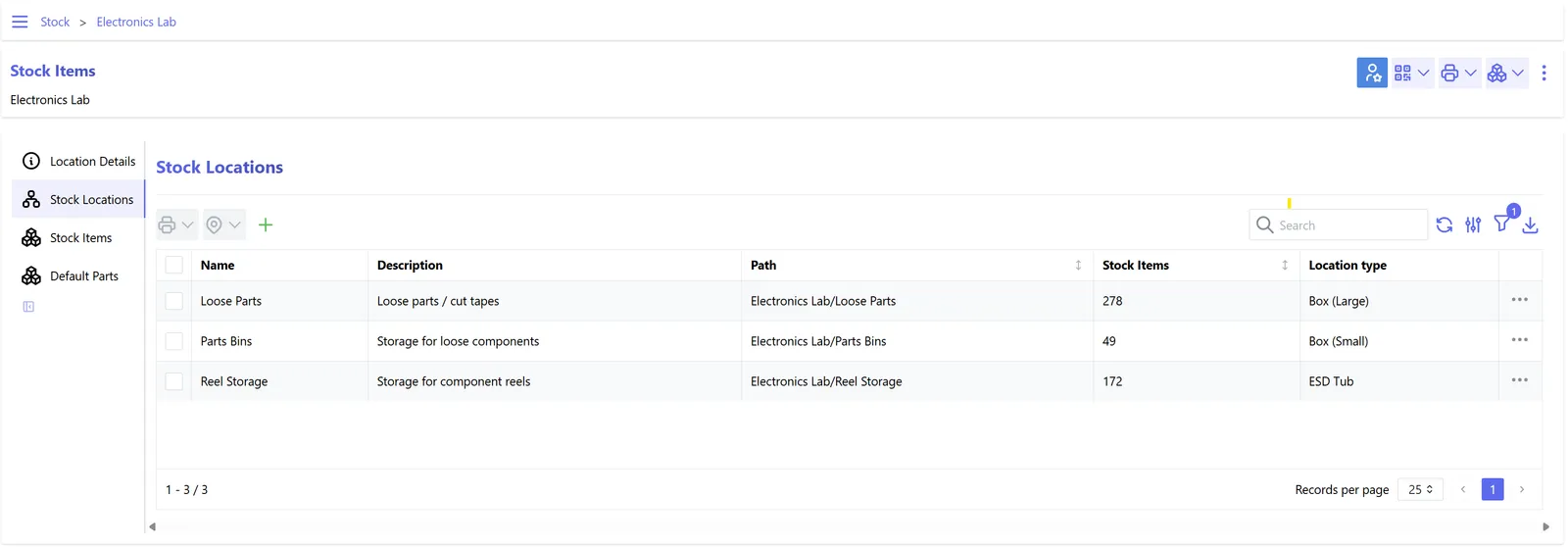
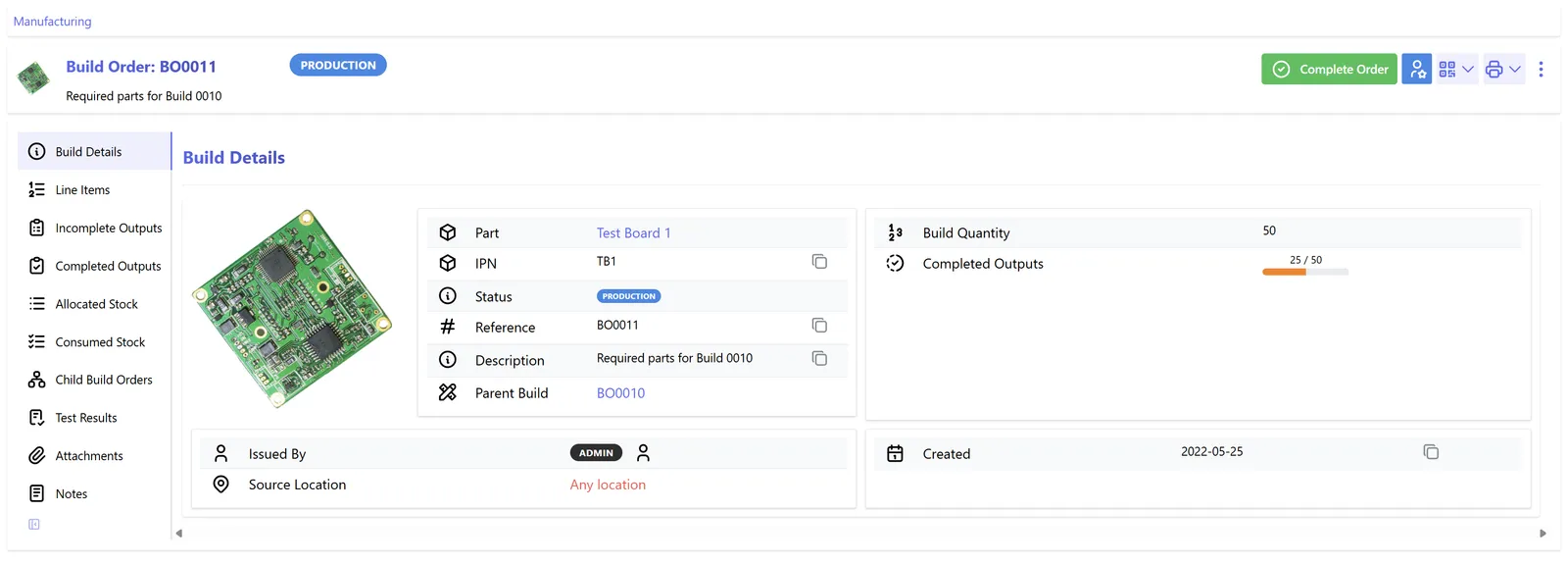
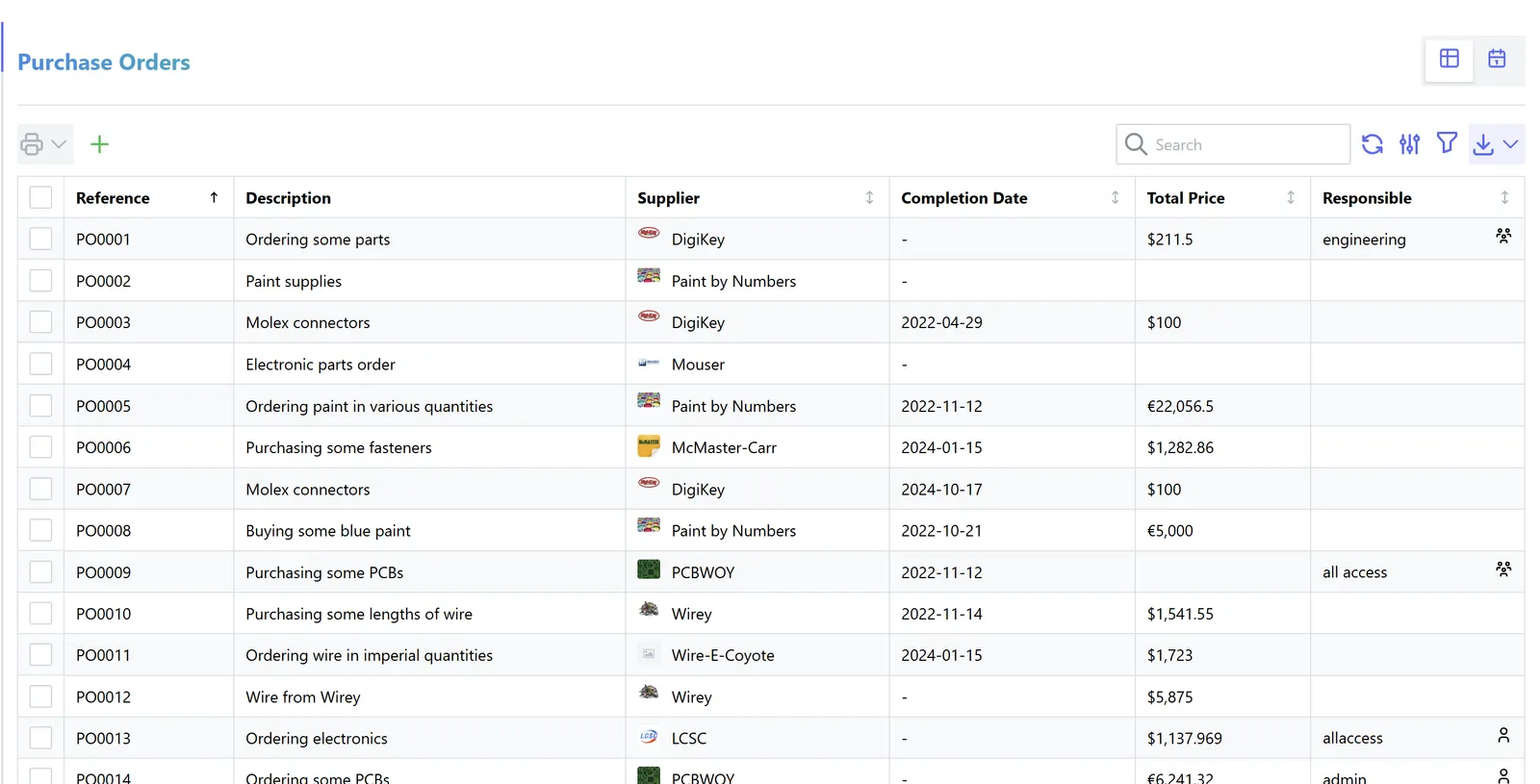
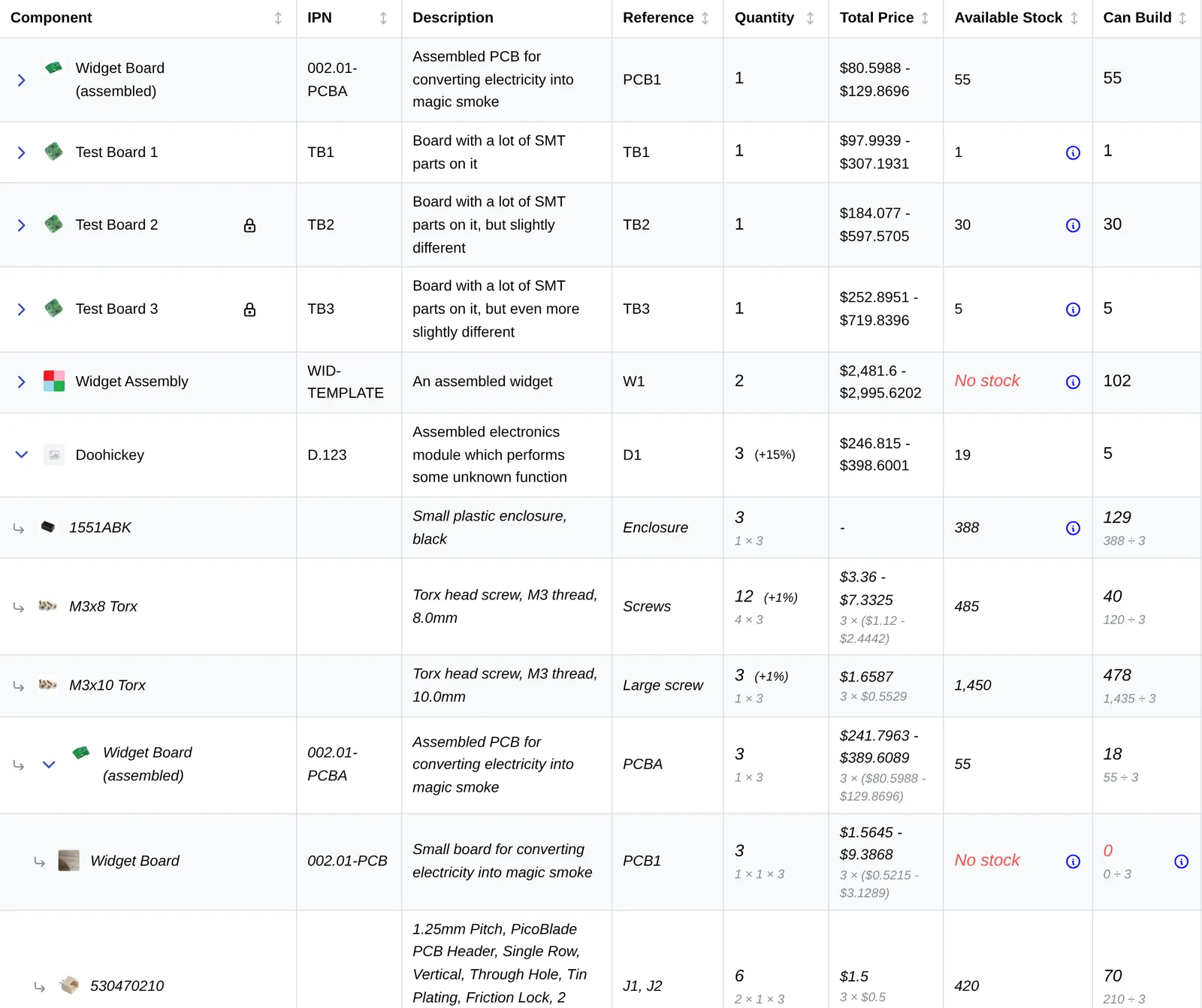
On a live walkthrough, we'll create a representative assembly, open its multi-level BOM, inspect stock availability, register a purchase receipt, allocate components to a build and review what happened afterward. You'll see the working software, not a slideshow of generic dashboard mockups.
Keep receipts, movements, reservations and consumption distinct. Follow the records when a customer asks about a specific unit.
Supplier item → recorded stock
PO-1042 / line 03Warehouse → shelf → bin
Stores / A / 04Reserve material for the build
Build B-020 / 2 unitsConsume parts, record output
Panel / serial P-0081Consider a control-panel manufacturer building a cabinet with several hundred purchased components. The same contactor may appear in multiple panels. Some units are in stock, some are already allocated and another batch has been ordered. The system keeps the component identity consistent while recording where stock sits and which builds have consumed it.
For companies with serial-controlled equipment, this makes it easier to investigate a specific item's history after assembly. The exact depth of traceability depends on the way your components, receipts and production records are configured.
Receiving a component, transferring it, allocating it to a build and consuming it are different events. Build orders preserve that difference, including subassembly relationships and serial-controlled output where configured. This is useful during rework, inventory investigation and customer service.
Serial numbers, batches, stock history and item test records can retain evidence against a particular stock item. For a panel shop, this may mean locating a serialized output and tracing supported source-component records. It does not mean every historical batch can be reconstructed if the shop never recorded the links.
Use scanning, mobile actions and labels to reduce retyping at receiving, stores and assembly.
Barcodes and the companion mobile workflows can reduce typing when staff receive, search for, transfer or count stock. Their usefulness depends on the equipment, labeling and permissions at your site, so we validate the actual scanner and handset workflow before promising it.
Supported stock labels, custom report templates and barcode/QR workflows can reduce lookup and transcription at receiving, stores and assembly. We'll test scanners and label printers with the selected installation; the hardware is not assumed to be included with the subscription.
Stock history, BOM requirements, purchase orders, sales orders, build progress and configurable reports are connected to the same records. Data exports, a documented API and supported extensions let you connect the system to other tools without pretending it is an accounting or enterprise planning replacement.
Compare avoidable purchasing premiums and write-offs with the managed-service fee. Use costs you can document.
No savings assumed. Enter your own costs and a defensible avoidable share. Implementation fees depend on your organisation requirements. Hardware, integration and taxes are included only if stated in the written proposal. Time released is not treated as payroll savings.
A useful estimate starts with things you can account for: time spent reconciling counts, avoidable emergency purchases, inventory adjustments and disruption from verified stock shortages. Enter your own figures to compare the cost of continuing the current process with the cost of a managed system. The calculator won't invent stockout frequency or assume that time saved means payroll saved.
External example: In a published NIST Manufacturing Extension Partnership story, Top Labels addressed inventory management problems with a tailored system. NIST reported $10,000 in savings for that company's project. It was a separate tailored implementation, not a deployment of the RISEC inventory platform, and the figure should not be applied to another factory without analysis. Read the NIST case study.
Choose the implementation and managed-service scope your operation needs. Core software capabilities are not withheld by plan.
1 facility
Up to 5 supported users
2 warehouse locations
2,500 active part records
1 facility
Up to 15 supported users
6 warehouse locations
25,000 active part records
Up to 3 facilities
40 supported users
15 warehouse locations
100,000 active part records
Custom scope if any Operations limit is exceeded:
3 facilities
40 supported users
15 warehouse locations
100,000 active part records
Implementation fees dependent on your organisations requirements. Scope, supported users, hosting, onboarding and support are confirmed in the written proposal. Hardware, extensive data repair and bespoke integrations are excluded unless specifically included. Package limits describe the managed service footprint; they do not remove inventory capabilities from the configured solution.
Start with the part lists, locations and engineering files your team already maintains.
Part codes, locations, suppliers and sample BOMs
Identifiers, revisions, units and ownership
Validate quantities and records before release
Test real receiving, stock and build workflows
You can begin with the spreadsheets or exports you already maintain. We review your part codes, warehouse locations, supplier references and a sample of the BOMs that cause the most difficulty. Next, we agree a data mapping and a deployment scope, configure the environment and reconcile imports before training users. A clean data foundation matters more than an impressive-looking empty dashboard.
Accounting, connectivity, migration and data access are part of the scope discussion.
The standard inventory deployment is not a financial general ledger, advanced production scheduler, full MES or guaranteed offline warehouse application. If finance, finite-capacity planning or live equipment feedback are requirements, we will assess Manufacturing ERP or Manufacturing Execution System instead of disguising a gap as a feature.
No. Inventory Management is focused on parts, stock, purchasing and production builds. We can review integration options, or discuss Manufacturing ERP if your accounting and production data must live in one application.
The underlying system supports serialized stock and manufacturing histories. We'll test your desired serial-number and material genealogy workflow using sample records.
Potentially, but the work depends on the files and the rules you currently use for part identity, revisions and substitutes. We assess those before quoting the migration.
The managed web deployment requires connectivity for its normal workflows. An offline-capable operating process would be a separately assessed requirement.
The customer agreement specifies access, export, backup, retention and termination handling. We demonstrate supported exports before go-live.
Bring one representative assembly, one purchasing problem or one inventory discrepancy. We'll show how the system handles it and explain what a managed deployment would involve.