Core
$999Monthly
- Supported asset and site scope
Up to 500 active monitored assets
2 service locations
Track customer equipment, maintenance schedules, service history, replacement parts, and renewal opportunities. Automatically organize follow-ups to capture aftermarket business before it is missed.
A machine goes out to a customer, the warranty runs down, a planned service date approaches and replacement parts become due. If those events are scattered across spreadsheets and service histories, it is difficult to know which customer needs attention and which legitimate revenue opportunity has been missed.
Aftersales Revenue Management connects your installed equipment history with service, coverage, parts and commercial records. It identifies supported opportunities, shows the evidence behind them and gives someone on your team responsibility for the next action.
Usable installed-equipment history. Evidence for due/coverage rules. Actual order or invoice references. Explore the steps to see what must be recorded or verified.
An alert is prospective work. Only a linked commercial transaction can establish realized revenue.
Begin with a known customer, site, model and installed machine.
Asset lifecycle illustration. An alert is not realized revenue.
The next step may be a paid-service agreement if an eligible offer exists and the customer has not already purchased coverage.
A due date or supported meter reading can justify a relevant inspection, replacement kit or service discussion. A guessed maintenance interval should not trigger an automatic sale.
Prior parts orders may establish a genuine replenishment pattern. The system can distinguish recurring demand from a one-off purchase instead of sending irrelevant reorder reminders.
A model, configuration, entitlement and actual service history can support a qualified retrofit or replacement conversation.
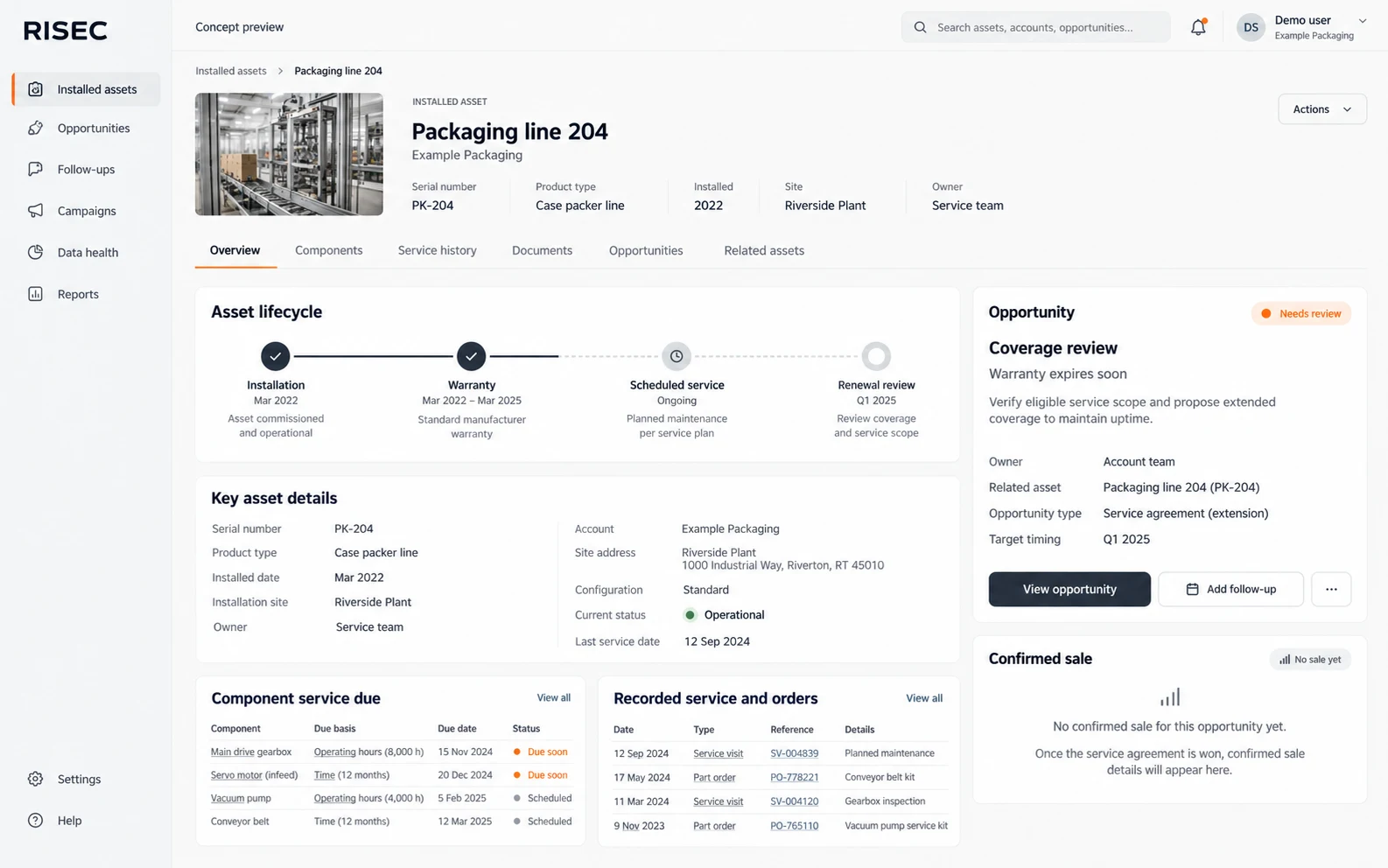
Consider a packaging machine whose warranty will expire next month. Your team can examine its installation record, actual coverage terms and service history before deciding whether a paid-service proposal is appropriate. The opportunity is assigned to a person, not just added to a dashboard. If the customer accepts, sourced commercial records can later show what was actually sold instead of counting the original alert as revenue.
Proposed interface concepts. Intended features require implementation and a verified demonstration.
When a new machine is installed, relevant starter spares, training, support or service agreements may be worth offering. The system evaluates whether that offer fits the actual model, scope and purchase history instead of sending the same generic upsell to everyone.
Track warranty expiration, agreement terms, covered asset sets and uncovered work. A paid opportunity appears only when the proposed work is genuinely eligible and not already included in active coverage. Site-wide contracts and partially covered services require more care than a simple date reminder.
Model and component rules can use actual dates, usage hours, cycles or approved fixed schedules. Show the baseline and confidence behind a replacement or inspection reminder. Replacement history must come from an actual supported record, not the mere fact that a service visit occurred.
Where order history establishes a defensible cadence, a gap may warrant a reminder or a parts discussion. A single replacement order is not proof that the customer should reorder every quarter.
Eligible opportunities may include replacement kits, consumables, preventive maintenance, calibration, remote diagnostic support, paid service, training, retrofits, overhaul, remanufacture or end-of-life equipment replacement. The action should carry the asset, offering, supporting history, due basis and any unknowns.
Filter on model, configuration, serial range, installation age, coverage, location or other relevant supported facts. Preview who qualifies, apply duplicate and suppression controls, and direct responses to a named owner. Approved communications and customer reminders must honor configured timing and contact settings.
A service technician can record a genuine commercial finding against an asset and hand it to the appropriate sales or service queue. A completed visit alone is not counted as new revenue. Opportunity records support assignment, follow-up, deferment, dismissal, closure and sourced transaction attribution, so management can distinguish prospective pipeline from invoiced business.
The intended onboarding accepts structured exports covering customers, sites, serialized equipment, warranties, agreements, service history, components, meter readings and parts transactions. Repeat imports should retain source identifiers, avoid casually duplicating assets and flag data that cannot support a safe recommendation.
A manufacturer's installed base already contains potential demand, but not every installation, warning or past purchase is a genuine sales opportunity. The system assesses supported data, identifies a specific eligible offer, assigns a commercial owner and tracks the outcome. It should help your team focus on justified work rather than automatically emailing every asset owner.
A more useful buying question: How much legitimate service and parts demand can your records demonstrate today? An audit of a representative group of machines is a better starting point than a claim that every installed asset hides a predictable amount of revenue.
Delivery boundary: The system is an aftermarket opportunity and follow-up application, not a warranty claims adjudicator, full field-service dispatch suite, ERP replacement or guaranteed sales-generation engine. Reported future capabilities are not sold as already deployed features.
Find newly delivered or installed machines that may need starter spares, consumables, training, service packages or an eligible agreement.
Flag approaching warranty expiry and qualified paid-service options where actual coverage and dates support them.
Identify agreements approaching renewal, including supported multi-asset or site coverage, without treating every warranty end as a contract sale.
Surface genuine coverage gaps for a specific work scope, distinguishing known uncovered services from missing data.
Use recorded due dates, maintenance rules or appropriately supported running hours and cycle counts to identify work that warrants attention.
Monitor supported installed-part dates, meter baselines and designed-life rules to recommend a relevant spare, kit or service intervention.
Recognize a credible historical reorder cadence and flag a missed window, without inferring recurrence from a single purchase.
Compare supported equipment configuration and actual commercial history with genuinely applicable offers, not invented customer wallet share.
Identify meaningful inactivity where current customer and equipment facts justify an owned follow-up.
Use model eligibility, supported compatibility and account context to identify a valid upgrade conversation.
Recognize appropriate service burden, age, condition or authorized product triggers that may support a larger lifecycle sale.
Let an authorized service person record a real spare, repair, upgrade or other commercial need and send it to the sales queue.
Relate customers, sites, asset models, serials, installation evidence, owners and actual usage context.
Evaluate coverage for the proposed asset, service and date; label unknown terms explicitly.
Associate suitable replacement parts, kits, compatibility, service positions, usage thresholds and warning periods with supported equipment.
Support actual due events and approved fixed reminder intervals while preserving the difference between scheduling and actual completed service.
Keep overlapping evidence for one commercial obligation attached to one active opportunity, avoiding repeated solicitation and inflated pipeline totals.
Rank supported urgency, value, confidence and account priority while exposing what is known and missing.
Assign work, qualify it, defer, dismiss, close or record the next customer action with reasons and follow-up dates.
Select supported accounts and assets by model, serial range, configuration, installation year, coverage, geography or commercial eligibility before outreach.
See qualified recipients before sending, use approved templates and respect customer suppression and configured reminder timing.
Keep email/manual service-demand context attached to the right customer and asset, with an option to link a qualified commercial finding.
Preserve messages and customer engagement history so a reminder is not mistaken for a successful interaction.
Import usable customer, site, model, installed asset, service, warranty, agreement, component, meter and parts history from existing exports.
Retain source IDs and detect duplicates or changed source facts on later imports.
Identify records whose uncertainty makes an automated recommendation unsafe.
Associate relevant customer quotes, orders, invoices, credits and service outcomes when trustworthy source evidence exists.
Distinguish the value of a proposed opportunity from a confirmed sourced sale, and preserve the link between them.
Compare due work, responsible owners, outreach activity and actually sourced outcomes without double counting overlapping triggers.
Share controlled commercial work records or references with existing systems while keeping one authoritative follow-up workflow.
Restrict accounts and actions to authorized users and supported customer scopes.
Choose a commercial plan based on the number of active assets being evaluated, not arbitrary feature removals or user-seat gates.
An Installed-Base Revenue Recovery Audit examines what customer, asset, warranty, contract, parts and transaction records are usable today. The output should identify evidence gaps, a first set of credible commercial workflows and what is needed to operationalize follow-up. It is offered as a separately scoped engagement.
A useful revenue model begins with confirmed eligible events, observed conversion data and actual contribution margins. It should never multiply the entire installed base by an invented average upsell rate or promise a percentage of revenue recovery.
Up to 500 active monitored assets
2 service locations
Up to 2,000 active monitored assets
5 service locations
Up to 5,000 active monitored assets
15 service locations
Custom scope if an Operations limit is exceeded:
5,000 active monitored assets
15 locations
Multiple operating entities
All standard plans include the approved core capability and unlimited internal users. Implementation fees dependent on your organisations requirements. Data import, rollout work, operating support, hosting and additional integration requirements are established in the written proposal. The separate audit is not silently included in the base subscription.
Packaging machinery OEMs and custom equipment manufacturers are the initial focus. The strongest fit is a business that knows which assets it has sold, earns revenue from parts or service, and has enough history to distinguish a genuine need from a guess.
No. It is an aftermarket opportunity workflow using relevant external and internal facts. Will it contact every customer automatically? Communications must follow approved rules, evidence and suppression settings. What if our asset data is incomplete? The system should show the uncertainty, not invent a maintenance or revenue event. Does it promise recovered revenue? No; financial results are attributed only when supported by actual transaction evidence.
We'll review a sample of installed assets, service records and parts history and discuss where a defensible aftermarket workflow can begin.