Team
$299Monthly from
- Supported managed scope
Up to 5 agents
2 inboxes
3 configured channels
Bring website chat, email, and supported messaging channels into one workspace with conversation history, team assignments, internal collaboration, and automated routing.
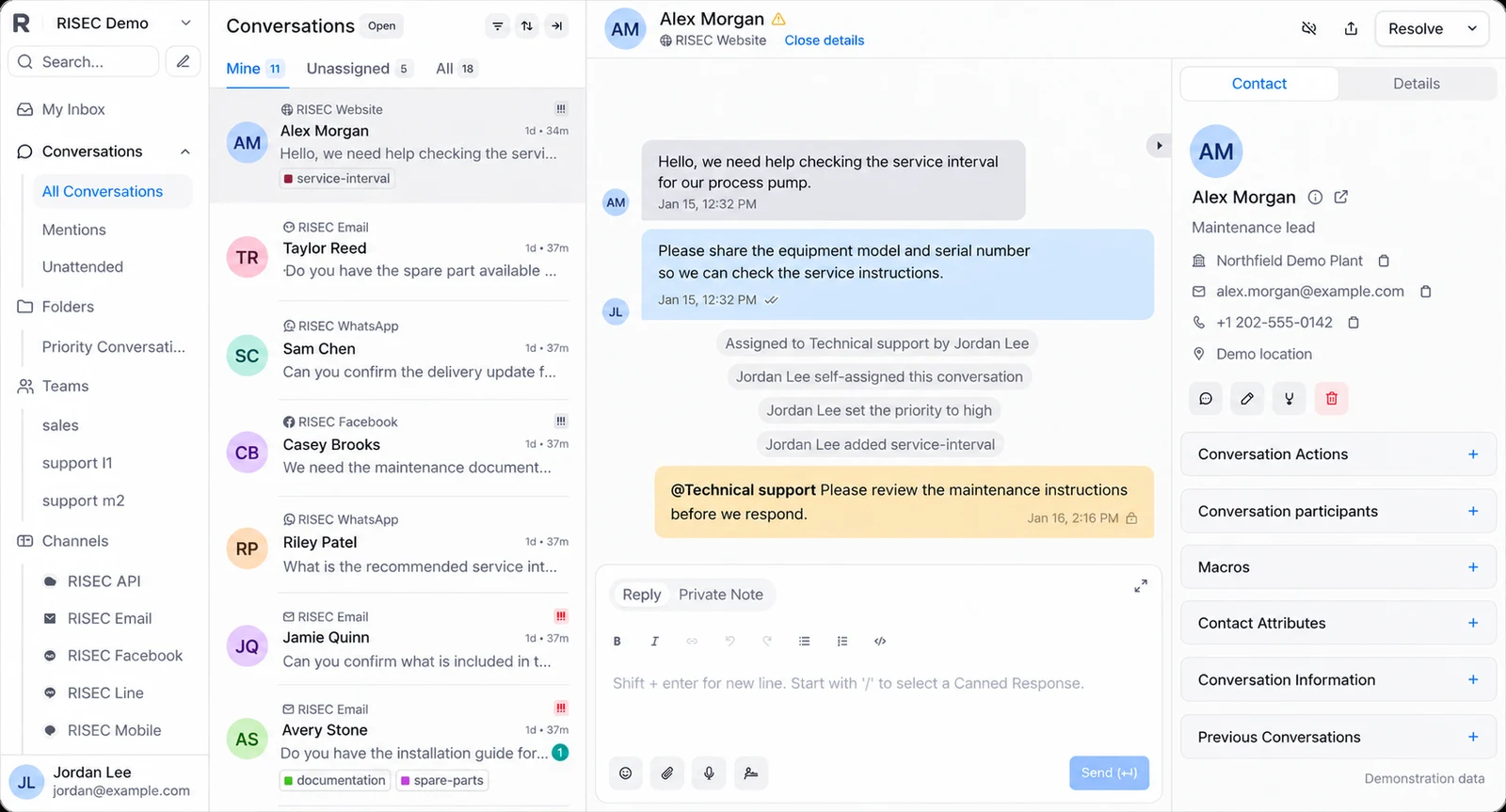
Representative interface with fictional names, avatars, contact details and conversations. AI and optional capabilities are included when defined in the agreed package and deployment.
A distributor may receive quote follow-ups by email, delivery questions through website chat and support issues through other connected channels. When those conversations stay in private inboxes, customers repeat themselves and staff struggle to see who is handling what.
Customer Support Management System provides a shared workspace for supported customer channels, with team assignments, contact context and conversation histories. We configure the system around the channels your customers actually use and the support responsibilities your staff can sustain.
Supported channel connections. Defined responsibility and coverage. Verified edition and access rules. Explore the steps to see what must be recorded or verified.
Receive a request through a supported configured channel.
Conversation workflow illustration, not a running application screen.
An enquiry reaches the shared inbox, is assigned to the relevant person and remains visible to the team. A follow-up can refer to the same conversation instead of starting a new thread without context. If someone is absent, ownership can be updated in the workspace rather than hidden inside their email account.
A customer emails at 4:45 pm about a shipment and returns to the website chat the next morning. Instead of asking them to repeat the story, the assigned agent can review the relevant conversation history and ask the warehouse a question in a private note. The customer receives one consistent reply, and the team can see who is responsible if more information is needed.
Representative interface with fictional names, avatars, contact details and conversations. AI and optional capabilities are included when defined in the agreed package and deployment.
Start with the website conversation widget and your service email inbox. Where the selected edition and provider configuration support them, add messaging channels such as WhatsApp, Facebook, Instagram, Telegram or SMS. The customer should not need to know which employee is monitoring which channel; the shared conversation is available to the staff authorized to handle it. Third-party messaging subscriptions and channel verification remain separate costs or setup tasks.
Team inboxes, assignments and availability-based routing help prevent a request sitting unseen in a personal mailbox. Conversation statuses, labels, priority cues, custom views, search and filters make it easier to distinguish urgent delivery questions from routine product enquiries. Private notes, colleague mentions and conversation history keep internal discussion out of the customer reply. Useful shortcuts, a command palette and canned responses can make repeat work less tedious without forcing identical answers into every situation.
Supported business-hour rules and automatic replies can acknowledge messages and tell customers when staff can respond. Capacity controls and team routing should be configured against how the actual support organization works, not used as a substitute for having sufficient agents.
Contact profiles retain permitted interaction history, relevant notes and customer details. Pre-chat questions, custom attributes and contact segments can help staff see the site, machine reference, order number or account type needed to give a useful answer. Segmentation and customer campaigns are available only where the edition, consent basis and actual business process support them. This is customer-context management, not a claim that the product replaces your ERP or sales CRM.
A published help center can give customers answers to common delivery, returns, support and operating questions. Staff can link those articles in replies. Where you need AI-assisted responses or knowledge-based automatic resolution, we will demonstrate the capability in the selected deployment and test escalation, source grounding, confidentiality and failure behavior before including it in the service.
Managers can review live conversations, workload and supported agent, team, inbox and label reports. Customer-satisfaction surveys and reporting exports can help find repeat problems and training needs. Establish a baseline for response time, transfers and unresolved requests before calculating any labor or service-level improvement.
Supported APIs and relevant integrations may connect support with collaboration tools, ticket systems, translation or commerce systems. Examples in the underlying ecosystem include Slack, conversational automation, embedded dashboard applications, translation and external ticket tracking. We evaluate each connector, authentication method and permission scope against the customer's workflow instead of claiming every listed integration is included and live.
AI functions vary by the selected deployment and operating configuration. We will not describe advanced AI reply generation, white-label branding, premium support or enterprise functionality as included unless the configured service actually supports them. If you need an autonomous knowledge-based agent, that becomes a separately verified technical and commercial scope.
A shared support queue matters most when a service request crosses departments, channels or shifts. Instead of asking a customer to repeat the story, an agent should see the existing conversation, know who is accountable, and use a relevant answer without rummaging through previous email chains.
Fewer missed service enquiries, less agent time spent finding context, more consistent handoffs and measurable follow-up. These are the metrics to establish during a pilot. We will not promise autonomous sales closing, unlimited channels or AI features beyond the agreed service scope.
Give customers a direct route to your team from product or support pages.
Keep incoming support mail and replies in a common, trackable conversation history.
Connect selected WhatsApp, Instagram, Facebook, SMS, Telegram, LINE and other documented channel types only after provider availability, access and charges are verified.
Assign work to a specific agent or team so responsibility does not disappear across inboxes.
Configure supported availability-based routing and balanced workload where the deployed edition permits it.
Set appropriate expectations when a request arrives outside coverage hours.
Separate urgent equipment issues, warranty questions, general support and sales enquiries without creating separate personal inboxes.
Keep active, waiting and resolved conversations visible with their context.
Coordinate internal troubleshooting without exposing that discussion to the customer.
Answer frequently repeated, reviewed questions more consistently.
Reduce time spent moving between common support actions.
Use approved rules for routing, notifications and routine handling where supported by the selected edition.
See who is asking and what has happened before responding.
Capture equipment model, customer type or support entitlement where collected and permitted.
Ask for identifying details before a conversation starts when that helps direct it correctly.
Reach selected customer segments through permitted channels when the commercial edition and consent configuration allow it.
Support documented localization and selected translation integrations subject to verification.
Publish maintained support articles, product instructions and FAQs that customers can access directly.
Organize information around real repair, setup and order questions rather than internal department names.
Evaluate knowledge-grounded answer suggestions, routine-response automation or an AI agent only when the actual configuration, privacy controls and escalation behavior are demonstrated.
Confirm how uncertain, sensitive and high-consequence cases reach an accountable employee, particularly for equipment safety and service commitments.
Measure workload and how customer enquiries move through supported queues.
Identify uneven workloads or missing follow-up capacity.
Collect feedback after appropriate resolutions.
Give a manager visibility into current queue conditions where supported.
Analyze actual trends without treating an automatically sent reply as a solved customer problem.
Assess connectors for collaboration, translation, ticketing, storefront and embedded dashboard applications; configure only those that match the customer's operation.
Agree who can access customer conversations, contact data and service histories.
Up to 5 agents
2 inboxes
3 configured channels
Up to 15 agents
5 inboxes
6 configured channels
Up to 40 agents
15 inboxes
10 configured channels
Custom scope if any Operations limit is exceeded:
40 agents
15 inboxes
10 configured channels
Specialist connections and multi-team requirements scoped separately
Implementation fees dependent on your organisations requirements. Hosting, supported users, channels, onboarding and support are confirmed in the written proposal. Third-party channel charges and capabilities requiring a separate commercial agreement are included only when explicitly quoted. Plan limits describe the managed service footprint; available features are confirmed for the selected deployment before contracting.
Measure the number of conversations, actual handling effort, handoff delays and time spent locating customer history. A useful estimate can compare measured administrative minutes, but should not treat every automated message as a resolved customer issue.
Supported inbox connections are verified during setup. Does this replace our telephone system? Not by default. Can customers see a help center? Subject to the edition and configuration. Will it connect to our ERP or CRM? Only after a specific integration review. Who has access to conversation data? Your deployment design and contract specify user permissions, hosting and retention.
Compare the same work before and after a validated workflow. Method time, staffing and service outcomes remain separate.
Enter your values to calculate a scenario. Inputs stay in your browser.
Annual volume × (current − validated handling minutes) ÷ 60
Illustrative calculation, not a quote or guarantee. Operating inputs are not sent with an enquiry.
We'll walk through how it could move through a shared inbox, including assignment, response, history and reporting.